


For a unit that is installed once and never moved again, a counter, a lobby shelf or an exhibition stand, the connection type decides more than the model does. Bluetooth vs wired speaker decisions in that setting come down to three questions you can answer before asking for a quote: how many different sources will connect over a year, what happens after a power cut, and who is standing there when the sound stops. Where the source is fixed and the unit is switched off at the wall with the room, an AUX or TF path is usually the safer default, with Bluetooth as the convenient extra rather than the sole route in.


When a Fixed Installation Makes Bluetooth the Wrong Default
Bluetooth is the right default when the source changes and the cable run is awkward. It is the wrong default when all three of these are true: one source plays all day, the unit is powered down with the room, and nobody on site is expected to touch a phone.
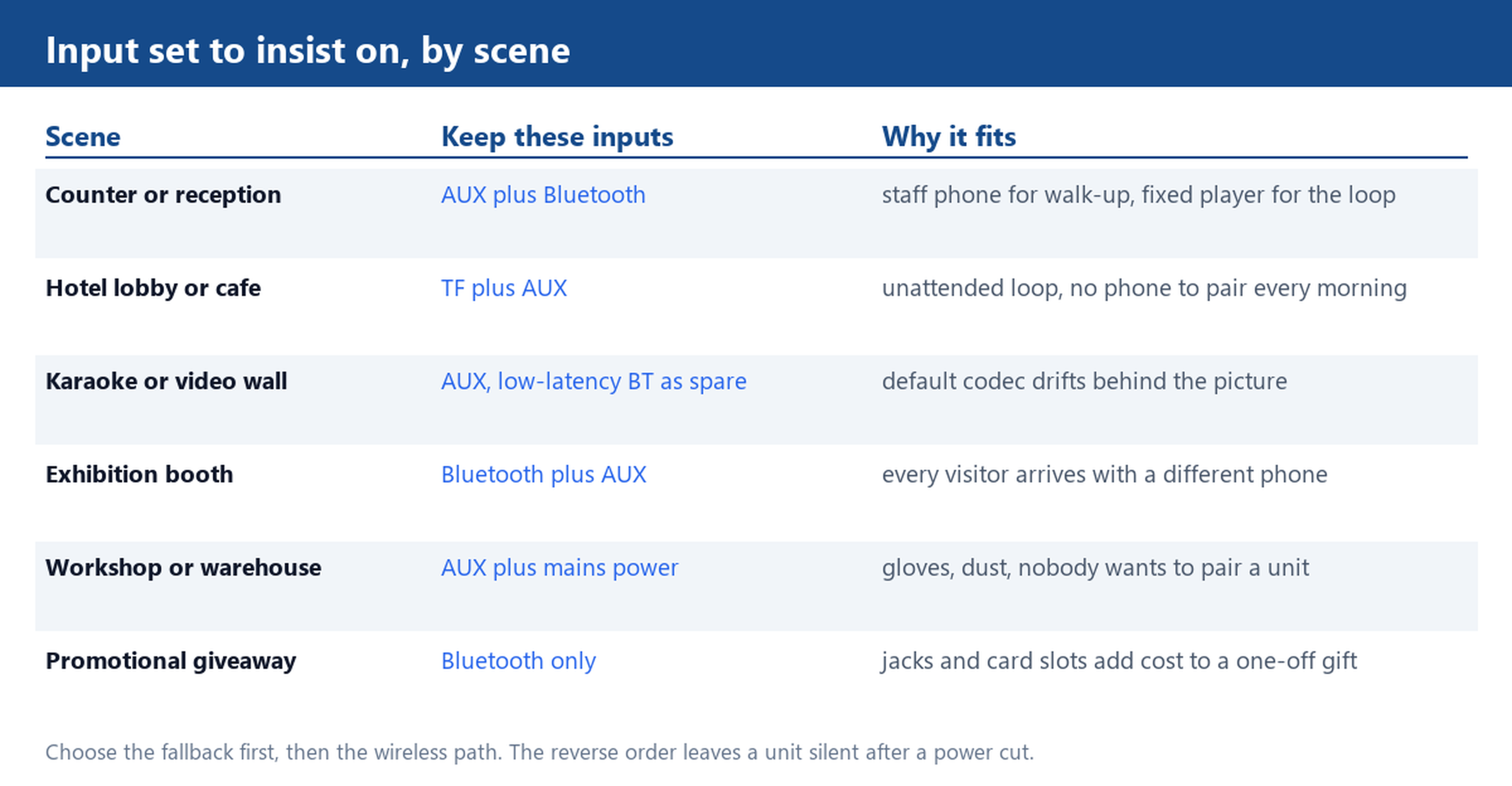
The count that matters is the number of sources over a year, not in a week. A hotel lobby with one media player is a single-source job, and a cable handles it with no pairing, no reconnection and no support call. An exhibition booth where every visitor wants to play a track from a different phone is the opposite case, and there the Bluetooth speaker range earns its place. Most real installations sit in between, which is why the input set matters more than the headline connection type: the practical answer is a unit that keeps both.
Measure the cable run before you decide. A 3.5 mm run that stays behind furniture and reaches the source in under 3 m is easy. A run that crosses a walkway, a doorway or a glass cabinet front is a trip hazard and a snag waiting to happen, and that is the case where wireless stops being a convenience and starts being the requirement. If the unit will sit inside a metal cabinet or behind a glass door, test the wireless link through the actual furniture before ordering, because a shelf that blocks the signal turns a well specified unit into a silent one. The mini speaker range covers both layouts in the same footprint, so the choice usually does not cost you size.
Pairing Once vs Re-Pairing After Every Power Cut
Pairing memory is held by the firmware, not by the Bluetooth version, and this is where fixed installations fail quietly. A unit that keeps its pairing list in volatile memory loses it when the mains switch cuts power to the whole room. The next morning someone has to hold a button on a unit that may be screwed to a shelf or tucked behind a display, and that task is performed twice before it is quietly abandoned.
Ask three direct questions before comparing prices, and ask them in writing so the answer can be checked against the sample:
- Does the pairing list survive a hard power cut, with the unit unplugged for a minute or longer?
- On power-up, does the unit reconnect to the last source without a button press, and how many seconds does that take?
- If two phones were paired yesterday, which one takes the link when both are back in range?
The test takes ten minutes and needs no instruments. Pair phone A and phone B, play from A, cut the power at the wall rather than with the unit switch, wait a minute, restore it, and watch which phone comes back and how long it takes. A unit that needs a press is not a bad unit; it is simply the wrong unit for a shelf nobody can reach. A Bluetooth 5.0 or 5.3 badge tells you nothing about any of this, which is why the sample test is worth more than the datasheet.

Latency: Where Wireless Delay Shows Up in Video and Karaoke
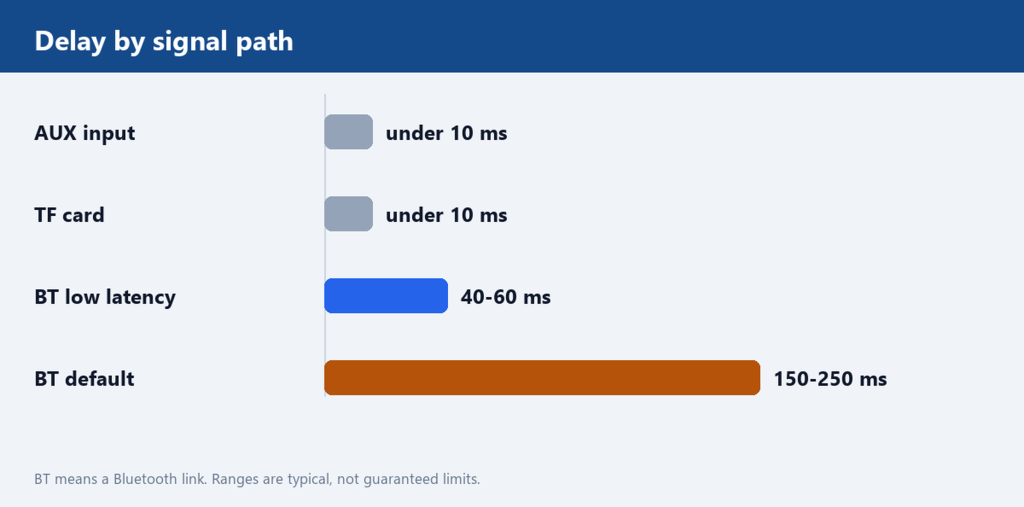
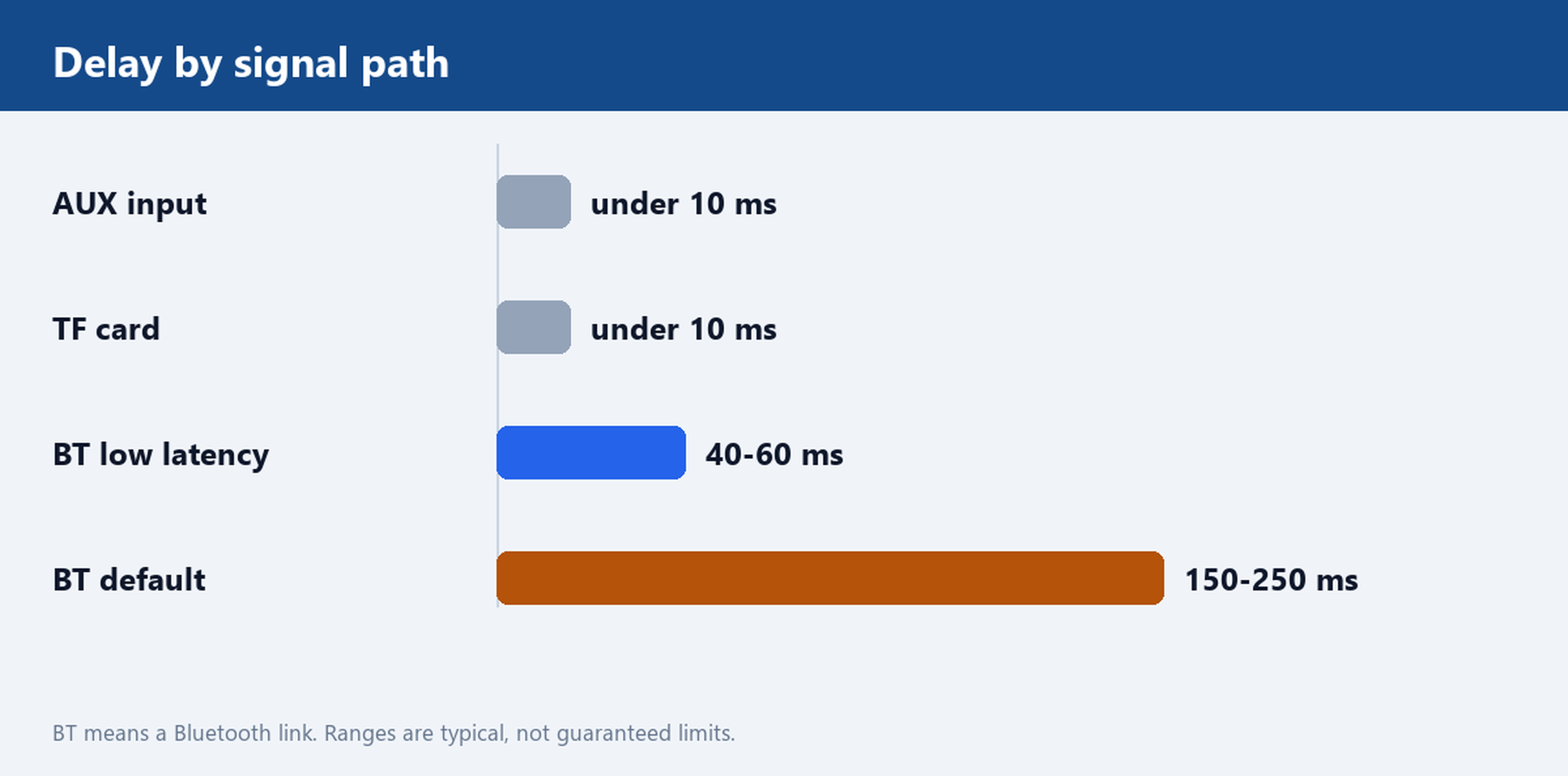
Wireless delay is the one trade-off you cannot fix with placement or volume. An AUX or TF path adds nothing you can measure: the signal reaches the amplifier and plays. A Bluetooth link buffers the audio so that a dropped packet has time to be retransmitted, and that buffer is the delay.
With the default codec, a consumer mini speaker typically runs 150 to 250 ms behind the source. With a low-latency codec the figure drops to roughly 40 to 60 ms, still measurable but rarely visible. For background music in a lobby or a retail loop, none of this matters. For karaoke, a video wall or a product demo where the picture and the sound have to agree, it does: viewers notice audio lagging behind lip movement at around 100 ms, and late audio is far more distracting than early audio. A speaker that sits next to a screen and feeds from a phone will look broken even when it is working exactly as designed.
The rule that follows is simple. If the unit will share a room with a screen, specify AUX as the primary input and treat Bluetooth as the spare. If the unit only plays music, latency is irrelevant and the wireless path wins on convenience alone. When a low-latency codec is offered as an option, ask which codecs are supported at both ends, because the delay is set by the slower of the two devices and a phone that does not support the codec falls back to the default buffer.
AUX and TF as Fallbacks, and Which Models Keep Them
AUX is a 3.5 mm line-level input. TF is a microSD slot that plays files with no phone, no app and no account. Both are inexpensive to design in and both are among the first features dropped from a cost-reduced variant, so they have to be written into the request instead of assumed from a photograph.
On the cable, remember that an unbalanced 3.5 mm run collects noise as it grows. Under 3 m a shielded cable is normally enough; past that, route it away from mains cable and dimmer feeds, and expect ground-loop hum when the speaker and the source sit on different circuits. A ground loop isolator costs less than one service visit. On the card, playback order follows the file names, so number the tracks 01, 02, 03 instead of trusting the order in which they were copied, and confirm the largest card size the firmware will address before you buy cards in bulk.
Two models in the current range keep both paths. The 3.4 W x 2 portable model with AUX covers a counter or a small room with a wired source. The TF, FM and AUX mini model is the one to look at when the unit has to play without a phone at all. For card-only playback across other housings, the Micro SD and TF card speaker range lists the options side by side.
Power: Internal Battery, USB Power Bank or Mains
A fixed installation belongs on mains power. Batteries are for portability, and every battery ages: capacity falls with each cycle, and a unit that has to be unplugged and recharged becomes a maintenance task that someone eventually stops doing. If the unit is switchable at the wall with the room, that is a feature, not a problem, provided the pairing memory survives it as described above.
Where the unit takes 5 V over USB, check the current and not only the voltage. A 5 W output stage draws more than 5 W at the input once amplifier loss is counted, and the peak draw on bass hits is well above the average. A 2 A adapter leaves headroom that a 1 A phone charger does not, and an underpowered adapter usually shows up as distortion at higher volume rather than as an obvious fault, which sends people looking for a speaker problem that does not exist. The USB powered speaker range covers the mains-adapter layout.
For sites that move the unit between rooms, a hybrid with an internal battery and a mains input covers both cases, at the cost of a larger enclosure and a battery that will need replacing in time. Ask two questions either way: does the unit play while charging, and does it keep playing through a brief cutover from mains to battery? A unit that mutes for two seconds on every switch is fine on a desk and unacceptable behind a bar.
What to Send Us Before You Shortlist Two Models
Four details decide the shortlist, and none of them is a specification number. Tell us the scene and who operates it, whether the unit is switched at the wall or left on standby, how long the cable run would be and what it would cross, and whether a screen sits in the same room. Add the quantity, the private label requirement and the power source you can provide on site.
With those answers we will shortlist two models and state, for each one, the input set it keeps, the pairing behaviour after a power cut, and the adapter current it needs, so you can compare the two on the points that actually break installations. We will also send a sample for a pairing test in the room where the unit will live, because that ten-minute test settles more than any comparison table. Send the scene and the power arrangement, and we will take it from there.